Providence College Athletics

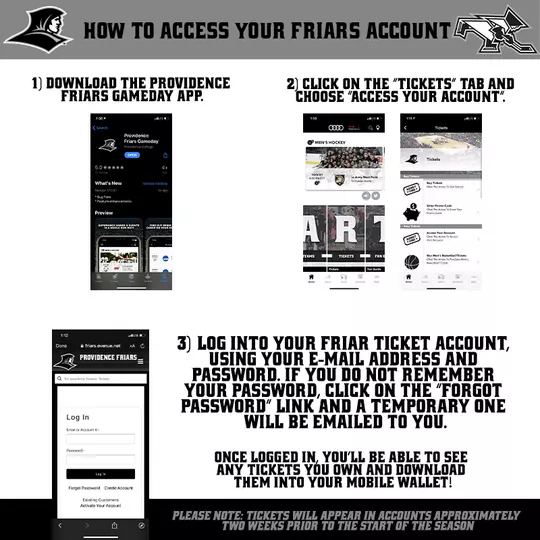
How To Access Your Friars Account | 1) Download the Providence Friars Gameday App. | 2) Click on the “Tickets” tab and choose “Access your account”. | 3) Log into your Friar Ticket Account, using your E-mail address and password. If you do not remember your password, click on the “Forgot Password” link and a temporary one will be emailed to you. | Once logged in, you’ll be able to see any tickets you own and download them into your mobile wallet! | Please note: tickets will appear in accounts approximately two weeks prior to the start of the season
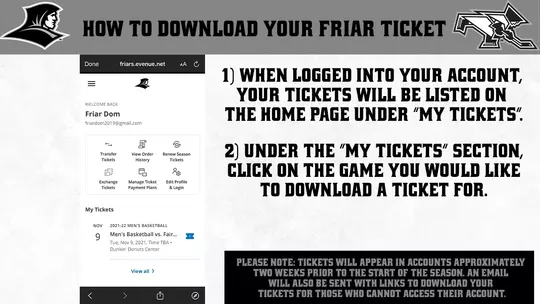
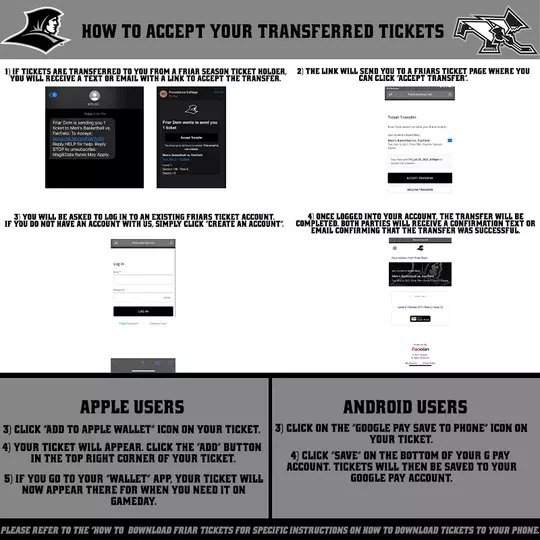
How to Download Your Friar Tickets (v4) | 1) when logged into your account, your tickets will be listed on the home page under “my tickets” | 2) Under the “my tickets” section, click on the game you would like to download a ticket for. | Apple Users 3) Click “add to apple wallet” icon on your ticket. 4) your ticket will appear. click the “add” button in the top right corner of your ticket. 5) if you go to your “wallet” app, your ticket will now appear there for when you need it on gameday! | Android Users 3) Click on the “google pay save to phone” icon on your ticket. 4) click “save” on the bottom of your g pay account. tickets will then be saved to your google pay account. | Please note: tickets will appear in accounts approximately two weeks prior to the start of the season. An email will also be sent with links to download your tickets for those that cannot access their account.
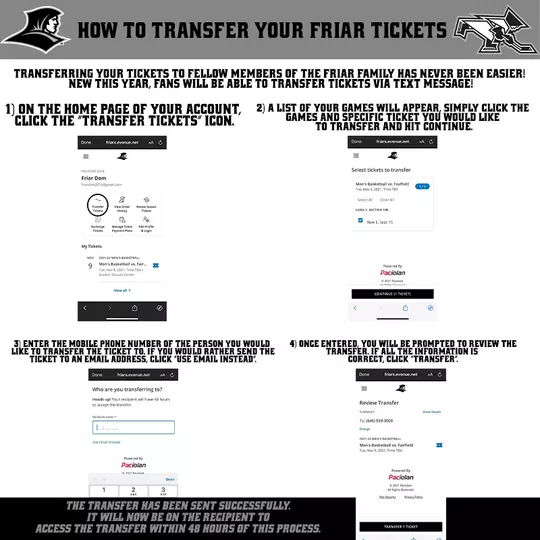
How to Transfer your Friar Tickets | Transferring your tickets to fellow members of the friar family has never been easier! new this year, fans will be able to transfer tickets via text message! | 1) on the home page of your account, click the “transfer tickets” icon.| 2) a list of your games will appear, simply click the games and specific ticket you would like to transfer and hit continue. | 3) enter the mobile phone number of the person you would like to transfer the ticket to. if you would rather send the ticket to an email address, click “use email instead”. | 4) once entered, you will be prompted to review the Transfer. if all the information is correct, click “transfer”. | The Transfer has been sent successfully. it will now be on the recipient to access the transfer within 48 hours of this process


Mobile Ticketing F.A.Q's

Before gameday! We strongly recommend downloading your tickets as soon as you receive the email that they are available. The easiest way to avoid any issues with your tickets on gameday is to ensure you have them downloaded into your mobile wallet before you get to the game!

Tickets should be downloaded to your Apple Wallet for iPhone users and the Google Pay App for Android users

Friar mobile tickets will be in QR Code format this year. The sport you are attending will be specified on the ticket, and an image of a Friar Coach, team or venue will be featured on the ticket.

Screenshots of tickets will work, but for ease of managing and keeping track of your tickets, we recommend using your mobile wallet instead.

No printed tickets will be accepted. All tickets must remain digital.

Yes. Emails will be sent to all Friar Ticket purchasers as soon as your tickets are available. In that email will be a link to download your ticket straight to your mobile wallet, no sign in necessary.

Each ticket will only scan ONE TIME. If you’re sharing tickets with friends, please be careful and make sure everyone is using a different mobile ticket to enter the game.

  • Tickets for any type of purchaser won’t be available until approximately two weeks prior to the start of the season. 
  • Once season ticket holders and mini plan purchasers have received their tickets, any tickets purchased within two weeks of the start of the season will be available for download immediately after the purchase.

Our team will be on site at every game with customer service staff in the ticket office and in the lobbies of our venues to help you with any issue you have. We can always reprint a ticket on site if needed. Please be aware, a $5 reprint fee may be applied in this instance.

Call our ticket office to make other arrangements for your tickets as soon as you can. We will do everything we can to accommodate you and make sure you can attend games stress-free. If you have already spoke to your account executive about this, you are all set!

Yes. More information on our donor rooms will be released at a later date, but they will also be going to fully mobile entry this season.

Download the Providence Friars Gameday App today and make sure you can log into your account. If you have any questions or concerns, contact our ticket office at 401-865-GOPC

  • If you know before gameday that members of your party will be entering the game at different times, we recommend transferring a ticket to those people ahead of time. 
  • If someone is running late or is unexpectedly not entering the game with you, you can always screenshot that ticket and text it to them. Be careful not to text them the ticket you are scanning in with, as every ticket only scans one time.

Transfer Ticketing F.A.Q's

  • Tickets can be transferred through your Friar Tickets Account via text or email
  • As a reminder, ticket transfer is completely free of charge!

Yes. The recipient of the transfer will be sent a link to accept the tickets and they will be asked to sign-in to an existing Friar ticket Account or create a new one.

Yes. Transfers can be cancelled up until the recipient accepts them. Simply click the “Cancel Transfer” button that will appear next to your transferred tickets on your Friar Ticket Account. 

No. A ticket can be transferred only one time. Once that ticket is accepted by the transfer recipient it cannot be transferred by the original purchaser again. Remember that each ticket will only scan ONE time on gameday. 

  • Fans can transfer tickets up to 4 hours prior to a Men’s Basketball game at the Amica Mutual Pavilion
  • Hockey and Women’s Basketball tickets can be transferred up until the start of the game